Do you need help with Twitter? Try #TweetJukebox. And come and share some Tweets!

Here is a very good article from author Olga Núñez Miret, one the LitWorldInterviews Team. Great information and I’m going to be looking at this option more myself.

olganm's avatarLit World Interviews

Hi all:

Today I’m sharing a post that I published in my own blog last week. Sorry to those of you who might have read it already, but people seemed quite interested, so I thought I’d share it with you too.
I know we’ve all been told we should use social media to promote ourselves, our businesses, blogs, books, painting, whatever we do. And I know we all have our preferences, or sites that we understand better, or we find more useful, or that don’t give us a headache.

I must confess I quite liked Twitter to begin with, when I joined a few months before I published my first book. I would follow people I found interesting, read their Tweets, and be excited if somebody decided to follow me. I read about the subject, I tweeted quotations, ideas, suggestions, retweeted interesting things…

I’ve met many interesting people through Twitter…

View original post 676 more words

Tips For Gaining Twitter Friends

“Social Networking and the writer…phooey!”

“I’m an AUTHOR/BLOGGER not a PUBLICIST!

Yes, that’s what all of us really think about it because it takes away from our writing, but it’s a necessary evil these days, IF you want to intentionally bring people to your blog. You might be surprised about something though. I’ll tell you about that in a moment.

For now I want to talk about gaining followers on Twitter. I know everyone has a way to do it, but this is how I do it. Since I am writing the article, I get to write what I want to. Yeah, I’m being professional now. If you look at my Twitter numbers they are not huge, but I gain an average of 100 a week since I have started and I am not an active go out and get them type. I’m too busy writing.

Twitty Bird

First off, DON’T PAY for followers. I won’t comment on that any further. If you need me to do so then stop reading now and move on to some other article. Okay I will comment. You don’t pay for followers because they are usually one person with as many as 20,000 accounts. How do I know? I get the Direct Messages in Twitter asking me to buy their follows. I used to. They’ve stopped recently. How many out of that 20,000 followers will buy your book or go to your blog article? You got it, ONE. You want real people who want to follow you.

Why do you need Twitter followers?

This will expand your web presence and bring more people to your blog. Agents and Publishers like a web presence for their authors. The larger the expanse the greater your free advertising for your work and thus the better your chances of getting published. They Google you!

One thing some people will tell you is that when they look at their Twitter numbers for clicks on articles they post they don’t see much response. Some people won’t click a link to save their lives. They right click and open it in a new window or tab. That doesn’t register as a click or as a Twitter hit on your WP stats. How do I know? I’ve tested it. Yes, that’s the 11 years of Data Analysis guy coming out in me from a marketing background.

HOW TO GET FOLLOWERS

1.     Tweet your Blog articles properly

  • Make sure to use the proper hashtags. If you don’t know what a hashtag is it’s the # symbol followed by a word with no spaces. One to be sure to use is #Blogs. #Poetry #Haiku #WritingTips #WriteTips #MondayBlogs #SundayBlogShare are some I use. Simply go to the search field in the top right and type something and see what comes up, like #Friday and see what might matches up with a Friday thing you can use. For Authors you would use things like #Amazon #Kindle #BYNR #Books #Romance. I think you get the idea.
  • Include a bit of humor or something relevant, so it doesn’t look like you just did an automatic Tweet from your scheduled Blog post. One way to be humorous is with the hasthtags, like I will put how I am feeling at that moment, #FeelingConfuzzled or #IDidNotJustSayThat. It doesn’t mean people are going to search for those hashtags but people out there looking around will see that and just think it’s funny then click favorite or ReTweet (RT) you and then more people see you. Also you can do a little message or something that is kind of your trademark.

Hashtag

2.     Go to the hashtags in the Search Field that you are interested in and favorite things you like and even Follow people you find interesting. Some might follow you back. Only do this honestly. You can get crazy with it if you like if you are just after Followers but I wouldn’t recommend it.

3.     This is a fairly sneaky way to do it. People to follow if you just want a follower are people with about the same number of followers as followings. This means that they either auto follow back or they just do it themselves when they see it.

Fun Smiley

4.     Put content not from your blog in Tweets just for fun with one good hashtag that is popular and one personal hashtag that’s a bit funny or just your personality, like I mentioned earlier in the first suggestion.

5,     Have fun with it. Don’t take this too seriously expecting thousands or even hundreds of overnight Followers. Set a reasonable goal for yourself if you like, make it an average.

6.     Don’t get to crazy with it. Don’t go out and just start begging for people to Follow you or look desperate with your attempts at the humor. Just be yourself and let your personality do it for you.

7.     Get involved with hashtag wars. One way to let your personality out AND be crazy is in hashtag wars. Look for them in trends on the left hand side or watch your fellow writers’ Tweets. Hashtag wars are when you do something like “#BadBeatlesSongs Help Me I’ve Fallen And I Can’t Get Up” Help is the actual song and you add some crazy stuff to it. It gets you involved and people see you’re not just around for business.

8.     ReTweet or RT as they say things you like, especially other professionals. You can make lists inside your Twitter to put people into. I have different lists and one is for people that are good for RT purposes. These are people that have great writing tips, expressions, quotes, or articles I can RT to my Followers. Does it get me more Followers? I’ve seen some people RT my RT and then Follow me.

Free Kindle Books

9.     ReTweet or RT great advice from people or Free downloads such as e-books/kindle. I like to RT anytime I run across Free Kindle downloads. Does it get me Followers? I don’t know, but my Followers get a chance to see something they might not be looking for. Also I have ended up with favorites and thanks from the authors offering the free downloads and sometimes they will Follow knowing I do RT like I do. I of course Follow them back.

10.    Follow fellow bloggers on Twitter. This isn’t a method really but I often times like to ask a female if it’s okay for me to follow them on Twitter. I don’t want them thinking I am trying to be weird. Even if it’s available on their blog I just sometimes want to make sure depending on the articles I read from them. Some have content that signals they are open to whatever in followers. But some have blogs that I just feel like it is best to ask first. But with people that Follow your Blog take time to see if they have Twitter. Which reminds, me I need to do that soon.

11.    If you run upon a WordPress blogger on Twitter you like, follow them in Twitter and WP and mention it in a Tweet to them. Yes you want to be courteous. I am not sure courtesy is a method. It’s just what I like to do.

12.    Follow regional people from where you are or like the same team you like. This is a part of having fun and having a personal interest in Twitter outside of it just being business. Sometimes people with a shared connection like this can be your most faithful Followers, because they are not following you just because of a professional reason.

Love my computer13.    Keep your Followers. You are going to lose some Followers so don’t worry about it. Just net gain more than you lose. I like to try to RT and Favorite something from as many of my Followers as I can if I can that is. I don’t do it unless I actually like something though. If I don’t like it I don’t do it. My Twitter policy is based on honesty and courtesy. It is just like my WordPress Following policy. I won’t Follow you unless I like something I’ve read or I like your About page.

The surprising thing I mentioned earlier is how being limited to a certain number of characters challenges your writing. I write poetry, haiku, in Twitter and find it fun. Sometimes I even end up using those poems or thoughts for blog content.

Twitter also allows you to talk to your fellow bloggers freely without doing so on your blog replies. I sometimes will shoot a Direct Message to a friend of something I saw on their content that formatted wrong. Best of all you get to bond with your fellow bloggers.

Enter your email address to subscribe to this blog and receive notifications of new posts by email.

© Copyright-All rights reserved-RonovanWrites.wordpress.com-June 19, 2014.

Add your website/blog site to your Gravatar.com site . . . PLEASE!

This is just a quick reminder to those who might not have given it a thought.

When I am wandering the blogs and see great comments I click on who left those comments. I don’t do that just to see a larger version of a pretty face, or to read a bio, I do it to find the website, their blog. I rarely find a blog and thus miss out on following that person.

So PLEASE:

  • go to your Gravatar.com,
  • your profile, then web sites
  • and add your blog site
  • You can even add your facebook and Twitter or whatever, but PLEASE add your blog site.

Thank you!

Ronovan

How, What, and Why To Create a Twitter List

Creating a Twitter List

by: Ronovan


This is going to sound strange to start off talking about making Twitter Lists before some of you even have Twitter but believe me this is when you want to know. Otherwise you will end up putting out a blog article asking people to let you know if they have Twitter so you can put them in a group AFTER you already have hundreds or thousands of people to sort through.


By starting now, early on, you can put them in a group as you add them. In other words . . . you’ll do it the easy way.

Creating a Twitter account itself is simple in that all you need is your name, email, and a password. The signup process walks you through the steps.


Today I want to talk about the Twitter Lists options.Twitty Bird

First up: Why?

You want to add your Followers or the people you Follow to certain lists based on what they are to you.

Examples:

Friends

Bloggers

WordPress Bloggers

Agents

Publishers

Photographers

Just Cool People

Good for RT Info


You can see there are various things you can come up with. Basically whatever helps you to remember. Also each time you create a List you get to add a description just in case you forget the reason for the group.


Second: What?

Once you have a List what do you do with it?

This is what I do with it so for any Twitxperts out there bear with me, I know you have your ideas.

  • I use my WP Bloggers list to find my WP Blog Friends and ReTweet (RT) any of their things that look cool to me, even just basic Tweets. People love personal funny sometimes over information article Tweets. It gives people a bond to you.
  • I use it to keep tabs on Literary Agents/Publishers to see if they have anything going on like a Tweet Pitch of your Manuscript (MS) coming up. Sometimes they will say for these two hours Tweet a Pitch of your MS. You have the 140 characters to use, part of which is the lit handle name. Go ahead and work on a pitch so you are ready now.
  • I use it to keep track of my Friends from school or home.
  • And I use it to actually see WordPress blogs that come out. With so many people I follow, the Reader in WordPress can be difficult, but on Twitter I can easily see who has put one out recently, if they have Twitter attached to their blogs.
  • And you can put those Companies that Follow you in a List along with those who want you to pay for Followers. Just so you have those annoying people out of the way.


Third: How?

So how do you set up a list and how do you actually use them? First off there will be those who tell you about TweetDeck. TweetDeck will allow you to set up all sorts of things, but for me, I like just clicking on a List and seeing what I see. I may go into TweetDeck in another article, but for now I will stick just with what Twitter itself does. Just give me the basics. I like basics.


Step #1

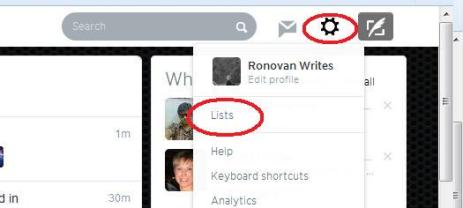
You are logged into Twitter and now you see in the top right corner, as of the writing of this article anyway, a little round Gear shaped icon. This is the ‘Settings and help’ icon. Click this and you will see a drop down box open, click ‘Lists’.

Lists


Step #2

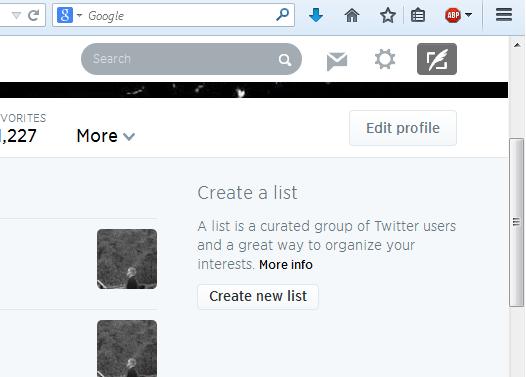
You are now on the Lists screen and you should see on the right a box that says ‘Create new list’, click it.

CNL


Step #3

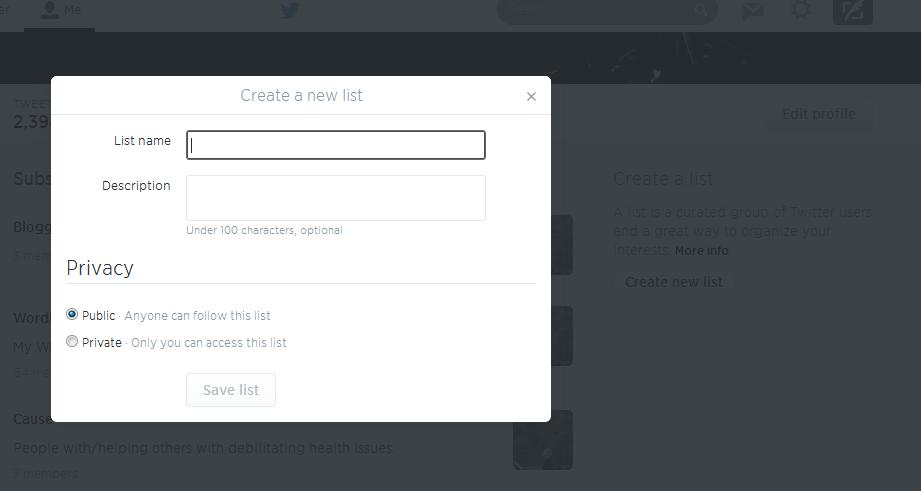
A box should now be on your screen with a ‘List name’ field/box and a ‘Description’ field/box. Type in the name of your List. You can also fill out the ‘Description’ if you like. I don’t always do that part. Once you have done this part you will choose if you want others to be able to see your List or not. So you choose ‘Public’ or ‘Private’ under the ‘Privacy’ section in the box. In all honesty I don’t want people to see my WordPress Friends list because I don’t want them using it to spam them for followers or with Tweets/messages about products.

CANL

Finally click ‘Save List’ at the bottom of the box.


Step #4

You want to add your Followers or those you Follow to a List.

Add To Twitter List

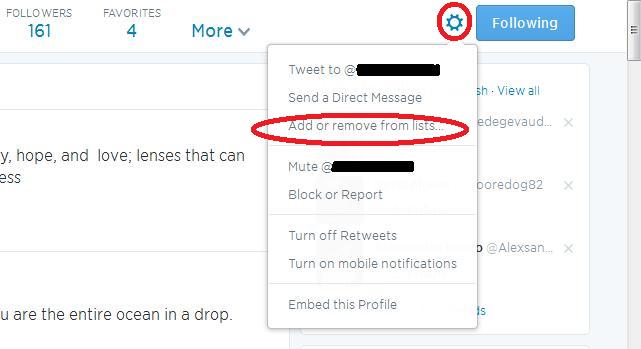
  • Go to a person and click the ‘Gear’ on their page. You will see ‘Add or remove from lists’.
  • A ‘Your Lists’ box will appear and you will just check which list(s) you want them to be in.
  • Then click the ‘x’ to close the box.


Step #5

To use your Lists just go to your ‘Gear’ and click ‘Lists’, just as you did in Step #1. Not only do you create Lists here but you also can see all of the ones you have made and the number of people in each one.

Then click the List you want to see. You could just stay on this list the entire time you are on Twitter for the day and only see Tweets from those people.

Maybe one day you just want ‘Inspirational’ Tweets because you need a pick me up. Make an ‘Inspirational’ List.

And remember, people can be in more than one List. I have a WordPress Friends list that everyone that follows me and has a WordPress blog, or that I follow for that matter and has a WordPress blog is in.  But some of those may fit into other areas. I may put some into a list like ‘Great for Editing Information’ or ‘Photography’.

You may be thinking “Why the bother, why not just look at all the Tweets?” You will want to support people on Twitter by following them, but you may not like their Tweets. You could just have a ‘Yes’ List and a ‘No’ List. One to view and one not to. That simple. And you can change the person from one to the other any time you like.


Copyright-All rights reserved-©RonovanWrites.wordpress.com-June 27, 2014.

Blogging Tips: It’s NOT your content.

It’s not your Content

by: Ronovan

 Featured Image -- 1487

You’re new to the Blog world or even been around the Blog a few times and you wonder “Where are all the people that should be lining up to read my work”. (See what I did there, “Around the Blog….Around the Block. No…I tried. And I have no idea why L. L. Cook J’s ‘Around the way Girl’ is going through my head now.)

Blogging is like a lot of things in life:

  • It takes time
  • It takes practice
  • You have to work it
  • And it takes great patience


When I started blogging I just wanted people to read my creative pieces. I didn’t really think about how many I wanted to read it or how I would get them to read it, I just wanted to create and click publish.


We like to say we don’t care how many people show up to the party. As long as we put out the nachos in case someone decides to join in we think we’re okay. But we all know we really like to see those faces show up, even those we don’t know. This article is mostly for people who want to increase their readership.


I want to say one quick thing. If your home page is where your most recent posts go then here is what might happen. A person goes to the page, reads the top article, then reads all the ones below it. You get one view for all of those read articles. Some people put in a ‘read more’ break that you place in during your posting process to shorten what’s on that page to create more space or they do it to actually force a click to the next page. I personally no longer do the ‘read more’ just because. I’m happy people showed up and try to make it easy as possible.


The truth is, most of us have content in our articles that is good. We’re going to connect with someone and we’ll find our niche or group we seem to speak to. But it doesn’t happen overnight.


Time

Like I said you can’t bring in hundreds of views of your articles overnight unless you just write some hot button issue and get it out on social networks properly at the right moment. Perhaps hot button is your theme. If so then make sure you do something unique with it to stand out from the crowd.


Practice

Getting your format set up just right takes time. I’ve been through several themes for my blog and tested the waters on what I write. I know what will bomb and what will receive some generally decent response for my site. I still don’t mind bombing as long as I have fun and don’t do it too often. I want my readers to know they can always show up and have something good/useful to read.  That is one reason I put out as much material as possible. The other reason…I’m insane.


Work it

It’s tough to say this but just putting your content out there doesn’t mean people will show up. You need to do some work and help people find you, in other words, get the ball rolling:

  • Visit other blogs and comment:  You are thinking you barely have time to do your own blog but you would be surprised at the ideas you        come up with by taking a few minutes to visit elsewhere. Blogging isn’t just about blogs, it’s a community of supporters.
  • Link back to other blogs but only if relevant: Don’t just put a link to another person’s blog in your article for no reason. Make it be because it pertains to your article. Honest blogs get honest followers who stay with you.
  • Share in Social Networks: Twitter, Tumblr, Facebook, Google+ or LinkedIn, whatever your options are use them and share your articles there and spend a few minutes just being at least remotely involved.
  • Tag your articles properly: This one is a work in progress for everyone. You have to look at your work and see what it is and what words best describe it. Visit other blogs similar to yours that are successful and see what kind of tags they use.


Patience

You have to be patient. Once things start rolling…they roll. But it will take some time. Just keep working and putting out a lot of content, but quality content.


That’s all for this time and I hope there was something useful for you. Just remember that it’s not always about the content or the writing.


The only way you will fail is by giving up.


© Copyright-All rights reserved-RonovanWrites.wordpress.com-June 13, 2014.