Keeping Your Sanity in Blog World

It doesn’t take long before those new to Blog World to experience the first feelings of impending . . .

Burnout sign

I experience it every day. Now although I have taken on more writing responsibilities I’ve started taking control of my Blog World. If you don’t do it in the beginning, it takes months to dig yourself out if you are like me. So why not start your experience off on the right foot, or left, or . . . let’s do this the correct way.


We all blog for different reasons. I love my Friends in Blog World but too much of a good thing and I am just about dead. I need time for other things, like writing my novels, spending time with my son, reading books (that are really for reviews for my blog) and sleeping. I may have forgotten something important in there, I am sure of it.

But breaks don’t always happen. That’s why you and I have to . . .


Three Ways to Keep your Sanity in Blog World

Before you even start a blog need to consider these three things and stick to them.

#1

Set boundaries for your Blog Life

  • How available to do you want to be?
  • Do you want to be personable in your interactions?
  • Do you allow access to your various social networks?

Basically you want to be able to have your readers connect with you through your writing. Be satisfied with that. You will make a few friends and I am not saying to limit yourself. Just keep your Blog World in Blog World. I have made some great friends and we talk on Twitter and Facebook. I’m not saying it’s wrong or bad or anything. If you have thousands of followers and 1 percent want to talk to you, that ends up taking a big chuck of your time. I have one friend who spends as great deal of time just responding to comments.

Also you want to remember why you are in Blog World in the first place, to Blog.

#2

Set a schedule for your Blog Content

  • You can write all you like, but I recommend that you save that writing in drafts for those days you just don’t feel like writing at all.
  • Set how many posts you want to put out per day and/or week and stick to it.
  • Make time to visit other blogs you enjoy.

I have had a problem with this. I blog write like a mad man. I am all over the place writing, and I do enjoy writing. I don’t want anyone to get me wrong about that. If I had saved my writing and limited myself to just 2 posts per day I would be set for the year. Just think about that. You could do all the writing your want and schedule it for months ahead, freeing up your time for writing your novel or whatever else you might like to do.

Another thing about content management. Give your content time to be viewed. If you load up content then things get pushed down and are not seen. Give it time.

#3

When your Blog Schedule is over . . . unplug

  • Disconnect from your blog and social networking
  • Set time for your other life activities.

This is a bit wrong in how I set it. You set time to blog, the rest is your life. Make sure that when you are not scheduled to do Blog World things that you disconnect yourself. Blogging can become an addiction. It replaces needs in peoples lives. We enjoy it, we can share it, we can be us, we can create, we can express ourselves, we are the world. Pretty cool stuff really.

I tried to set a schedule not long ago and ended up feeling guilty as people felt I didn’t want to talk to them. Well Ronovan has to toughen up or just get out of Blog World. Schedule is coming.

Blogging is a great life. If you manage it from the beginning you don’t need to worry about burnout so much and you will enjoy it a lot more. Some reading this will hate it. They will say “You can’t schedule your friends.” Well you know what? I would rather schedule my friends than burnout so bad that I lose them.


Much Respect

Ronovan

bloglovin

2014 © Copyright-All rights reserved by ronovanwrites.wordpress.com

How to do Bloglovin. It’s pretty easy.

Bloglovin’ It

What is it?

First, if you are a Blogger then you can break this up into three parts to make it less work for you at a time, although it’s not that much work. For some of us it just takes time away from blogging itself. And it LOOKS like a lot of work.

Let’s look at two basic purposes:

#1

Just to Follow blogs

For a lot of people that either don’t want to sign up for accounts with a lot of different blog providers just to follow a blog, or don’t want to subscribe by email, Bloglovin’ can be a great alternative. Simply go to Bloglovin.com, sign up and follow any blog that’s on the site or add a blog to the site. These blogs are from every imaginable blog provider, from blogspot to WordPress. I don’t mention those to promote those but one is toward the beginning of the alphabet and the other is toward the end.

#2

As a Blogger

For bloggers this is a great way to have people follow your blog without  having to do blog accounts or email subscriptions. Even I am hesitant to do the email and I am a blogger. I do follow a handful that way but I receive enough email driven from my own blog to keep me busy as it is. Okay so I don’t get that much from my own blog but it’s still email to go through. And the more email you have the more of it that turns into junk for you, my blog included.

Once you register your blog with Bloglovin’ then your posts will show up on Bloglovin’. Yes, you read correctly. You don’t have to share or do anything special after you have registered your site itself, not just registered as a member. I repeat after you become a member and then register/claim your site, that’s it.

How do you do it?

#1

Just to follow blogs:

Simply sign up by going to bloglovin.com. When you first register you’ll be asked if you want to use facebook or your email to register. If you use facebook then you will have any friends that are on Bloglovin’ already with blogs perhaps automatically in your list. Kind of cool. I did the email option simply because I like to keep my Blog world and my everyday world separate and manageable as I like it.

bloglovin_register

Then you search the categories for something you like or search for that favorite blog you like, perhaps ronovanwrites. Several of my friends are there but too many to mention and I don’t want to slight anyone here. Once you find a blog you like, such as ronovanwrites  follow it. Then every time you log in you will see posts available to click and check out and even on the right side of the screen see a list of your friends and how many posts they have going on at the time. Did I mention ronovanwrites is on Bloglovin’? Well if not, ronovanwrites is on Bloglovin’. Hey, if I don’t promote myself who will, right?

#2

For a Blogger you need to sign up just as above. Then: (Updated-12/09/14)

  • Look at the top and to the right and you will see the Heart icon.   Click and you will see ‘Settings’ in the drop down list. Click it.
  • Next you will need to scroll down until you see, Blogs by Me  and a button next to it that says Add Blog. It’s located under the Profile section. Click ‘Add Blog’.
  • Now a screen called Blog analytics comes up with the ‘claim blog’ button.
  • Type in your blog address and search for it. bloglovin claim blog imageIt should come up. Click your blog. If it’s not there you need to register it and Bloglovin’ does well showing you how.
  • Crazy as it sounds, my blog actually had a couple of entries already and I had never been to Bloglovin. I just picked the one that had the most followers and claimed it. It was my address. People can put in a blog they want to follow so don’t be surprised if you see your site there.
  • Whoa! What do I do with that box with the script in it and says ‘Claim blog’?bloglovin_register_html
  • To actually register you need to copy that text into a new post on your blog in the TEXT tab, not the VISUAL tab. You know, just like when you share a video.
  • Once you publish the post and go back to Bloglovin’ you are now registered. Difficult, huh?

How do you add the Bloglovin’ Widget?

No need for numbers now, this is all Blog World business. And it’s simpler than it at first seemed as I tried to follow some directions.

  • First thing, it’s a Widget that will be in your sidebar.
  • I would go ahead and have a Text Widget open and read so you can copy a simple code from Bloglovin’.
  • The image is in the code so no worries there. The Bloglovin’ Widget site has different widgets you can choose from.  Click ‘Get this icon’ under the one you like and copy the code into your text widget. Save it and guess what, you’re done.
  • You can always change your widget when you like, just choose the one that best fits you, your blog and your theme.
  • And also it’s not a bad idea to change up that widget at times just to make things look different and draw your readers eye.

“But wait, Ronovan, some people don’t look at those thingies on the side. What other way can I let a visitor know how to follow me on Bloglovin’?”

  • Copy a Follow me on Bloglovin’ image you like and add it to your media in your blog.
  • When you create a post, add the image and then click the image in your post editor and add the address to your actual Bloglovin’ site. Make sure to check the box for open in different window if you like. What, you didn’t know you could add a ‘link’ to your images? Yep, you do it the exact same way you do any other link. Click the image and then the add a link option in your post editor.
  • Sounds tedious that you need to do it each time. Nope. It’s just like adding any image but this time you have one that should be called Bloglovin’ and one link in your list called Bloglovin to add to your image.  It’s that simple.

We all freak out a little when we start using these new to us features/options, but the truth is, once you actually sit down and walk through it yourself to explain it, it’s easier than a lot of people think and make it sound. I’ve found some sites that just totally confuzzled me. I probably confuzzled you. Have questions, ask me, or I am sure any of my Blog friends who do Bloglovin’ can help as well.

Much Respect

Ronovan

bloglovin

2014 © Copyright-All rights reserved by ronovanwrites.wordpress.com

Blogging Tips: 3 More Ways to Increase Your Views . . . the easy way.

I’m a fraud.

I’m a fake.

I’m a liar by mistake.

I’m a spinner.

No complaint.

Hope this doesn’t make you faint.

(If the rhythm feels familiar you may recall a song by Meredith Brooks that was quite popular back in the mid 1990s. I just put my own words to it.)


Do you ever get the impression a blog site must be old and the blogger has years of blogging experience? People have said that to me about my site and experience. My experience has nothing to do with the age of  my blog, four months and counting I believe, or vast technical know how related to blogging, Google is a friend y’all.

Where does my experience come from and my sites modest level of following? And yes it is a modest level believe it or not. It comes from pouring my heart out to y’all, researching various ways a blog works, and using my 11 years of marketing analytical skills, my eduction, and my gut instinct. But most of all, I use my love of people. If you want to increase views to your site, love people. Just love ’em and be honest in your writing. You don’t need to read any further. If you are really into making some quick success of things then read on, but if you want to make it easier and more relaxed . . . love ’em.


 #1

Don’t content your viewers to death! (or yourself)

I’ve learned this one through my own personal experience. In the early going  of your blog (if you are out to generate traffic/views/people visiting your site) you need to put out a bit more content. Then settle down. Work on a good piece and put it out. And then sit on it.

How often you put out content/articles/posts depends entirely on the purpose of your blog and your own need at the moment.  If you are wanting to develop a loyal reader following, give them quality pieces and give them a chance to read them, react to them, and you a chance to respond to those who comment. You may write a magnificent article or poem but it gets buried in all of your content. I’ve done it! This is something I have recently become passionate about. I get an idea, I write, and hit publish. I can’t help myself. Write a great piece and run with it for a few days then publish another great piece.

Putting out your great pieces slowly, even if you have five prepared will keep you from burning out.


#2

Pay attention to what what viewers are clicking and liking.

I have to admit this is not one I do very often in regards to determining what I write. I do notice and in speaking with blog friends I’ll comment on it. But I write what I write. But if you are wanting to specifically bring in followers and viewers, write what they like. You think that’s an easy one, right? You would think that’s one we all should realize. We don’t. One thing about this, if you’re trying too hard to write for the readers, the readers can tell, and it begins to sound fake, and becomes a turn off.

My content is me. Why that appeals to some people, I have no idea. People in person don’t find me appealing. (That may have sounded a bit wrong there . . .  or maybe it sounded right.)


#3

Scheduling for the right time of day.

I believe I have mentioned this in other articles but I’ll repeat it because it saves you time. Americans are the biggest blog viewers around. I’m an American blogger. When I write, I write for the whole world in that I write on universal topics. When I schedule my articles to go out I take three things into consideration.

  1. What is my regional target?
  2. What age group am I targeting with the article?
  3. When will they be at work?

If your blog is geared toward, or article is specific to one region/area/country of the world then you need to consider what age group your largest amount of readers are in because of when they will be available to read the articles.

Being an American blogger I schedule my articles to publish normally around 9AM NYCT or Noon NYCT. Why? People primarily check blogs when they get to work and have settled in or they read them at lunch time. What about the rest of the USA or the world? The eastern seaboard has a massive readership. Leave your blog alone for a few days and everyone will get a chance to see it. Publish at lunch NYCT and you might be able to get lunch time eastern/NYCT and morning time in the western time  zones in the USA.

That being said I also publish according to the time zone for Britain. Why? I love British bloggers and want them to see my articles. That’s a five hour difference and that may hurt my views but sometimes I don’t really care. I just like to have fun with it. I reflex and schedule at certain times, but if I do think about it I change it up to Britain and sometimes Australia.


And that is a few ways to increase your views. If you’re having fun, it comes through in your work and people will have fun with you.


For the first 3 Ways to Increase Views and Make Your Life Easier.

Much Respect

Ronovan


2014 © Copyright-All rights reserved-RonovanWrites.wordpress.com



Add your website/blog site to your Gravatar.com site . . . PLEASE!

This is just a quick reminder to those who might not have given it a thought.

When I am wandering the blogs and see great comments I click on who left those comments. I don’t do that just to see a larger version of a pretty face, or to read a bio, I do it to find the website, their blog. I rarely find a blog and thus miss out on following that person.

So PLEASE:

  • go to your Gravatar.com,
  • your profile, then web sites
  • and add your blog site
  • You can even add your facebook and Twitter or whatever, but PLEASE add your blog site.

Thank you!

Ronovan

Trying out the Bloglovin way. Will update you as I go.

Follow my blog with Bloglovin

If you are not receiving email notifications from WordPress blogs . . .

If you are not getting notifications of from your own blog such as from comments made by Readers, or you subscribed to a WordPress blog and are not receiving the emails of the new posts, or if you are sending an invite to someone to either Follow your private blog or become a contributor on your blog, then go to the following link and scroll down to the bottom to ‘Block Emails’ and make sure the ‘Block all email updates from blogs you’re following on WordPress.com’ box is not checked.

https://wordpress.com/settings/notifications/


How to turn your Readers OFF.

What_The.jpg

What the . . . Pho? I bet you thought I was going to say something else, right? Well maybe not considering this is my blog and you don’t see me using language of that sort. One reason you don’t see me using it is because I don’t use that language in life. First of all, I’m not going to be getting preachy here. That’s not what this is about. I want to help you get more traffic through your blog’s doors.


The ‘What the . . . Pho?’ is actually a noodle restaurant that some friends and I just love the name of because here in America we have naughty minds at times. We can say this and people around us just look at us funny. One of the friends played the organ/keyboard in church and he would look over at me and I would mouth the phrase and he would suddenly bend over in convulsions doing all he could to focus on his music. The other friend was the choir director. He had learned long ago not to look at me. Yes, I tended to be a little mischievous if the time was okay to do so.


“So ‘What the . . . Pho?’ do you know about this and ‘What the . . . Pho?’ does this have to do with blogging?”


I’m glad you asked.


How to turn your Readers OFF


One of the first decisions you need to make when you create a blog or even when you begin writing an article for publishing is . . . “Am I doing this to get more people to read my writing?”


“I write for me. I don’t write to satisfy others!”


We like to say that but that isn’t always true. If you have a blog and want to bring people to it, then . . . yes you are writing for them in a manner of speaking. Here are tips to turn your readers off, depending on the type of blog you have. I am going with a blog type that has the average person who wants a nice, safe place to go for entertainment.


#1

Put Profanity in the Title of Your Article

You probably have never even really thought of doing that, but I’ve seen it and it instantly turns me away. It doesn’t even make me curious about the article. It could be by the Pope and I still wouldn’t read it to see what medications he’s on.


If it happens enough, I stop bothering with that blog at all.


RonNoBeard BW“Ronovan, you’re a prude!”


Ron Cover ShotFar from it my Friend. I enjoy all types of blogs, I just respect intelligently put together content.


#2

Articles Laced with Profanity

Notice I said ‘laced’, meaning filled with it. I’m not a fan of proFANity. Yes I made a pun. I am chuckling on the inside. Seriously. Can’t you tell? You’re screens should be shaking now. Okay, maybe not. I do however understand while reading something real life that words happen. Sometimes a word may fit a situation. I may choose another word while another person chooses a different word. No big deal.


I have a problem with the articles that are laced with it as shock factor. It doesn’t match what I know of the writer. It doesn’t match the piece being presented. It was placed there in an attempt to either shock, evoke humor, or just for no reason at all.


RonNoBeard BW“We can say what we want, stretch our wings, and experiment, you dork!”


Ron Cover ShotVery true, and I experiment as well. I just know myself and what my Friends have come to expect and I will stretch my wings within that boundary and at times it’s more challenging to do so. Write a sensual poem that conveys a lot without saying much in sexually. It’s a fun challenge.


#3

Being Derogatory

I write poetry where I slam bullies and the like. I don’t spend an entire article running down a people, a country, or a system or a mental of physical illness in generalities. Yes, there are times when certain articles need to be written. However, they need to be written in an intelligent and rational manner or the reader tunes out, turns away, and turns the channel.


If you are going to do it, pick your battles so people hear you. Run things into the ground and your words become a blur. That is unless you are targeting that audience who only wants to read about that issue.


RonNoBeard BW“Ronovan, there are certain things that are just clear cut!”


Ron Cover ShotThe issue may be clear cut but the entire story never is.


#4

Back to Profanity

If you are going to use a word then wait for it. Build up your reader, hook them in, get their support, and then when you throw the word in, it isn’t AS MUCH of as a turn off. It might still happen, but less likely.

RonNoBeard BW“If I use the words I want at the beginning it grabs their attention!”


Ron Cover ShotDo you want respect as a writer or attention as a shock hack?


I would go for a 5th one just to make it a Top 5 list but that’s pushing it and pushing you to read something weak. So I’m not going to do it. I’ll stop with 4.


Keep your articles clean and professional and only use certain words when you honestly believe they need to be used. I’ve stopped following several blogs of late for multiple headlines using certain words. And if you know me you know I follow lots of people of all types and language use. And there are even a few articles that are laced with profanity that make a point, but it’s rare, and I slowly begin to shy away.


I hope this article proved useful to you. If so, leave me a comment, so I know I’m helping you out. Sure a ‘like’ works as well, but I like to hear from my Friends at times.

If you found this helpful you can also find other tips by clicking here.

Much Respect

Ronovan

Inside the Life of . . . Amanda Lyle, Blogger extraordinaire.

Must read blogs are rare. We all have blogs we like to read, but then there are the cannot miss blogs. What websites or blogs keep me coming back for more? Sites with entertaining content that give real life moments in humorous ways at times, but can surprise with a bit of the serious and the deep of the  heart. There are a few of those out there but one that I find very entertaining, primarily due to the personality that breaks through every paragraph is Insidethelifeofmoi. Now to introduce the star . . .


Meet Amanda Lyle

Insidethelifeofmoi


Insidethelifeofmoi_Amanda_Lyle_Copyright.jpg

(Don’t miss the Thailand adventure movie Attack of the Mankinis at the end of the interview.)

Quote3


Ron Cover ShotRW: Amanda your bio says that along with your blog you also have three bambinos and a husband? I didn’t know you were Italian.  How do you manage all that and a blog?


Twitter_Amanda_Lyle_copyrightAMANDA: I feel like I’m in the ‘cirque du life’. I’m juggling fire, I have a few plates spinning, and all whilst walking a tight rope. It’s difficult to keep those plates spinning. It’s almost impossible to juggle fire without getting burned. When I started blogging I was writing a lot more, 3 or 4 times a week, in fact. As my blog grew in popularity, it meant I had to devote more of my time, time as a mum, I didn’t really have. The way I managed things, was to reduce my posts to twice a week. My number one priority is obviously my children…and my husband! (he might be reading this!) I generally write in the evenings when my husband is watching the football, or some gangster, too-much-shooting-and-dying-for-my-liking, film. So, to answer your question, it is very difficult, but I find it equally rewarding.

Continue reading

Adding the Twitter Timeline to your Sidebar.

People like to see what you are doing. Your website is you. It is the center of your universe. This is where people can go to know what they want to know about you. One thing people want these days is ‘what is this person doing on Twitter?’.

Adding the Twitter Timeline to your Sidebar

by: Ronovan

The following steps will help you get your Twitter Timeline on the sidebar of your blog. People can even click it and choose to Follow you on Twitter. Don’t worry about the  number of steps, if you’ve been through any of my how to do things before then you know I make every single thing a Step. 1-5 are simply clicking on the things you find in your Dashboard. 6 is finding something on the page and 7 is where you actually start doing something for real and even that is just a lot of words describing mostly easy things to do.

Step #1

Click on your DashboardTwitty Bird


Step #2

Scroll down and click on Appearance


Step #3

Click Widgets


Finding Twitter Timeline WidgetStep #4

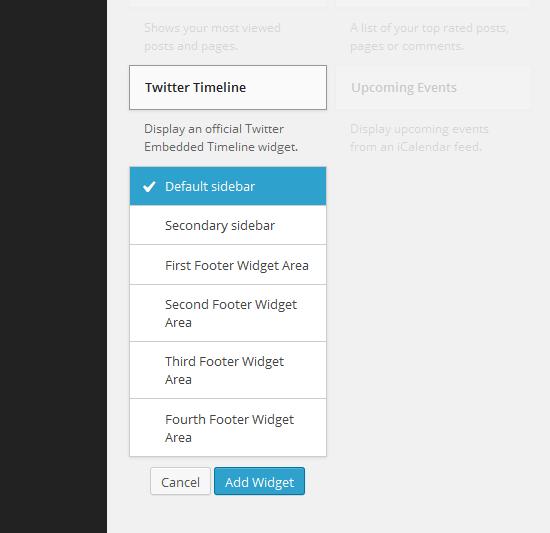
Scroll down and click on Twitter Timeline


Step #5

Choose Default Sidebar and then click Add Widget


Step #6Default Sidebar

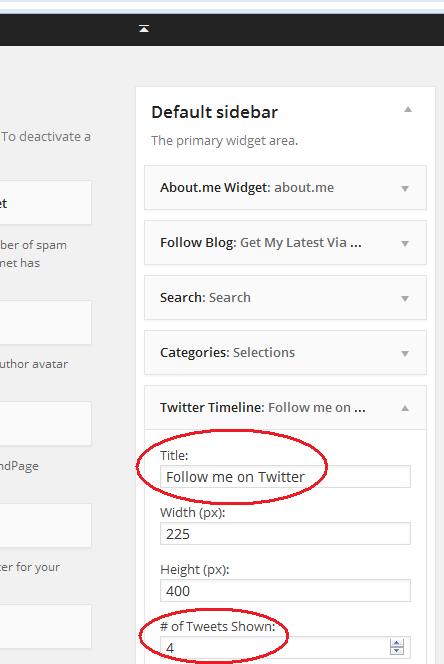
Now look at the top and middle of your screen for the Default sidebar area and you should see Twitter Timeline.


Step #7

I am going to only talk about two areas within the Twitter Timeline box at this time. This will get you up and running.

  • Title-Name What you want the heading to say above your Twitter Timeline, think the heading. Some say My Tweets. Mine says Follow me on Twitter. Be cute if you like, whatever fits your page and personality. Maybe you want it to say TWEET TWEET, or TWIT TWEETS. Whatever you type will appear in capital letters.
  • I lied there will be three areas I talk about. The next is # of Tweets Shown. This is your own preference. If you already have a somewhat full sidebar you may want 4 or 5. If you just love Twitter, crank up higher.


Widget ID

  • Now onto the Widget ID. There are 3 things to be aware of here. The create a widget at Twitter, Widget ID field, and Save all of which are circled.Widget at Twitter Configuration
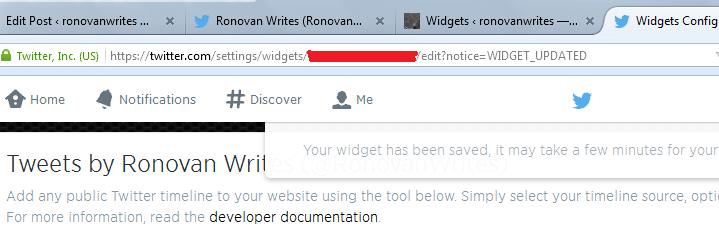
  • Make sure you are signed into Twitter when you actually start this part of the process, because it leads you through it. When you click on create a widget at Twitter another window will open for your Twitter account and look like this. Just make sure your Username is correct. You can choose to Opt-out of tailoring Twitter at this point. That’s up to you to explore. Then click Create widget.
  • Then Save or Save Changes.


Twitter ID Number

  •  The ID number you need is in the address bar at Twitter where you saved you just created a widget. You’ll see it in red in the image above. Of course mine is marked out here. But you just need the numbers.
  • Once on the next screen you need to get the actual Twitter ID number.  It will be in an address bar with /settings/widgets/then a lot of numbers. You just want the numbers as shown above. Copy and paste those numbers into the Widget ID field. Then click Save. Or you can always just write them down and then type them in, save your keyboard keys, right?
  • Once complete click Save and you are done. Open up your Main Page in a separate window and see if you are satisfied with your Twitter Timeline location. If not satisfied simply drag the Twitter Timeline within your  Widget area back where you added it to where you would it to appear in order on your Default Sidebar.


Now whenever you Tweet something it will show on your webpage. Also it allows people to Follow you on Twitter with a click. Make it easy as possible for people to connect to you.


If you have any questions. Let me know.

Much Respect

Ronovan


© Copyright-All rights reserved-RonovanWrites.wordpress.com-July 06, 2014.

Connecting Twitter to your Blog to Publicize your Blog articles.

You’re scared to death of Twitter. IT FREAKS YOU OUT! No worries. You don’t really have to be there to use it. Just have an account and let WordPress do the work for you. Here’s how to connect Twitter and WordPress together.

Don' Freak Out Meme

Automatically Sending your new Blogs to Twitter

By: Ronovan


Be logged into Twitter.

Go to your Dashboard in your blog

At the bottom you will find Settings, hover over this and a box will appear, click Sharing in that box.

OR

If you click Settings a box of options appears below it and you can choose Sharing there.


You will see various social networks to link to. Choose any you like. For now click connect beside Twitter. Then accept it asking you to connect.


Difficult, huh?

Easy Button

Now whenever a blog of yours posts it will go to Twitter as well, or should, it is technology after all.


Bonus Tip

You’ll notice in the Add New Post section, where I am typing this now, that on the right side where you have the Publish button there is a Publicized: Edit Settings  option. If you click Edit you can customize the message that will appear with your Twitter announcement of your blog post. I sometimes put in the hashtags I want to use, you know the #Blogs or #Photography things you see sometimes. You don’t have to go to Twitter to do anything.


Also when you click Edit you can uncheck any of your authorized connections you don’t want the article to Publicize to. Like I don’t always want mine to go to facebook.


But that’s how simple it is.

Buh Bye Kitten


© Copyright-All rights reserved-RonovanWrites.wordpress.com-July 03, 2014.

Blog Tip: Tag Blog Articles Right

Blog Tip: Tag Blog Articles Right

by: Ronovan

Tags for Blogs isn’t easy. Or is it? You have a great article but no one comes to pay you a visit. Why not? You didn’t send out the invitations. I am going to make this pretty simple. Using a restaurant as an example to give you Blog Tagging Tips so that your Blog Articles will be friendlier to SEO or Search Engine Optimization. Think Google, Bing, and Yahoo.


Welcome to Restaurant RonovanWrites.

Please look at my Menu on the right which I call Categories

Please select a Dish from the Entree List of Poetry, Writing, or any other Entree you would like.

The ingredients can be found at the bottom of each  Poetry,Writing, or whatever dish you like as the Tags.


Restaurant RonovanWrites isn’t a big deal to people. It means nothing. I need to have what people want. That means a nice menu they are looking for. An example would be Poetry. Okay so I have the dish but what are the ingredients in the dish? Some people want veggie tacos, some beef, pork, or chicken.


How will people know what you have unless you tell them?


So your dish is Poetry and now you need to tell the customer what is in the Poetry you are serving. You created the dish. You know what is in it, the feelings and descriptions. Those are your Tags.


If I have a poem about my Migraines that are very bad, my Tags might be; Migraines, Pain, Headaches, Suffering, Anger, Darkness, Personal, Depression. I normally also put in Poetry, Writing, and Creative Writing, and I if I am using a personal Photo I add Photography. Blogs is also a good Tag to use.


There are those who use just a few Tags, but in truth as long as you don’t go over say 10 or so, I think you’ll be fine.


Now when a Search Engine reaches out it will see your Tags and the Category. Your Title is also important. Make sure to only capitalize the important words, the proper words. And also use key words in the first paragraph or so of your article. If you notice during some of my articles I have the images about a paragraph down, at least the first image. This is why. Search Engines don’t read Images but they do read something the various descriptions you put in the images when you load them. More on that subject another time.


I want to explain something quickly. I haven’t been overly active in really trying to pull people into my site. I know how things work. I mainly work on creating. A lot of what I create does not lend itself to SEO or Search Engine Optimization results. If you are writing articles like this then you should use everything you can. For my poetry, I’m not going to write the first lines of my poetry so Search Engines will like it more.


I hope this helps.


Much Respect

Chef Ronovan

© Copyright-All rights reserved-RonovanWrites.wordpress.com-June 30, 2014.

Blog Tip: Links to Blogs and Articles-How to and WHY

Oh . . . you linked to this other great site for us? Thank you so much. Now I will read things on their page and since this one opened up in the place of your page I will completely forget about returning to read the rest of your article. Have a nice day! Love, your faithfulest follower ever. xox smiley smiley winky winky

There are two thoughts on the idea of how to do links. To have them open up in the current window or in a new one. This will show you how to do it in a new window. This also shows you how to create what is called a Ping Back.


But WHY is it sooooo IMPORTANT to some to have links open in other tabs or windows?!

 Image of a Book with a Question Mark

I think you can agree that your blog is the most important blog to you. Sure you LOVE other blogs but you put a lot of time into yours and you want people to at least finish you article before they totally lose interest in you and go off wandering the world of other blogs.

Linking to other blogs in your articles is a GREAT thing to do, especially if they are legit, honest, relevant links. I’ve begun to do it more often lately as I’ve found articles out there that inspire me to write on certain subjects or that just fit what I am writing. I have even went back in and edited an article to link back to another article I found.

But some bloggers want to make sure that when the reader clicks on the link that it opens in a new window.

They want their article to remain there present for them to see and remember. Not something they have to remember to click the back arrow to get to.

What if you have important information later in your article, or a link to something YOU have?

If you don’t know how to link back to a page here are the ‘How To’ instructions. If you do know how, here are the instructions anyway and a reminder of where the box to check for opening in a new window is.

You are in your Posts section of the Dashboard on WordPress (Other Blogging Platforms will be different, but it should all be similar in nature.) and you are wanting to link an article.

Step One

How to Add Link to WPYou need to highlight the words you want the reader to click on in order to open the link. The words can be anything. Notice in a lot of articles you read it says click here to do something. Well the URL does not say ‘here’. They are doing what you are doing now by going through these steps.

Once you’ve highlighted the words you then go to . . .

Step Two

Add Link Button

Click the icon that to me sort of looks like a weird paperclip. It’s circled in red above.

Step Three

Adding the Link Here you paste the URL in from the article or Blog you want to link to in the ‘URL’ field.

Then you click the box next to ‘Open link in a new window tab’.

Finally click ‘Add Link’ in the bottom right corner of the box.

Now when anyone clicks the link in your article a new window will show up to read that article in while leaving your article available to them to read.

You do the same thing when adding a link. an URL to an image. Click the image and then the paper clip link thing. Exact same process.

WARNING!

If you Reblog and the person is just reading in the Reader window the links don’t go to a new window it seems. But if they click on View Original then they work fine.


© Copyright-All rights reserved-RonovanWrites.wordpress.com-June 23, 2014.


Don’t ALLOW people to control YOU.

Don’t ALLOW people to control YOU.

by: Ronovan


Why are you not a success? You know why, because everyone is right about you. You give up every time.

Sounds a bit harsh doesn’t it? It does when put like I just did. But that’s the way we are told or the way we think it.

I wrote recently about Female Executivea lady executive from Coca Cola that I heard at a business luncheon. In that article I wrote about doing your best at whatever you are doing at a given time. Well I mentioned she gave two pieces of advice that day. I actually typed those pieces of advice up and saved them on my computer. What? You think I remember all this stuff?
As important as doing your best always is, controlling you is even more so. What do I mean by controlling you?

You LET others cause YOU to give up.

You ever had someone make you so mad that you just decided not to do whatever it was that you wanted to do that you were going to enjoy? If you answered no, I’ll give you a few moments to think about it so you can say yes.

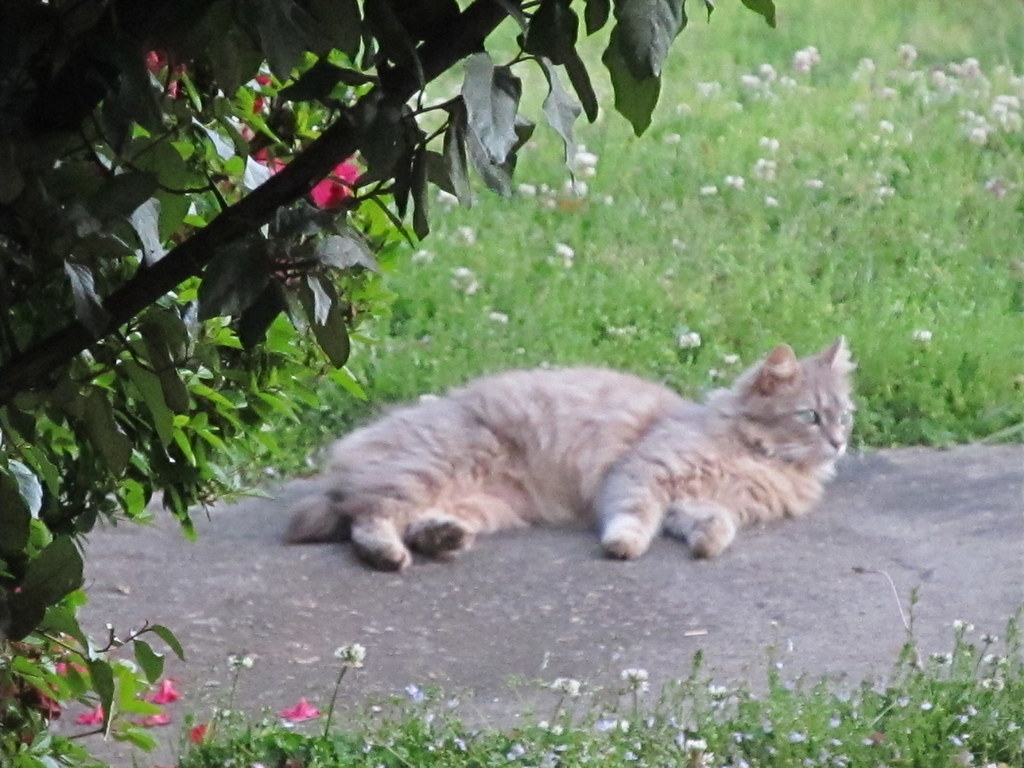
Kitty In Repose

Now that you had a chance to look at my cat, Kitty, I will go with a unanimous ‘Yes’ to my previous answer. And her name is Kitty, that wasn’t just a different way to call a cat. The lady executive explained that growing up she faced many people who told her she could not achieve her goals.

  • You are black and can’t get a good education.
  • You are black and female and can’t go to college.
  • You are black and female and can’t compete in business.

If she had listened to them, she would have allowed them to make her give up. By agreeing with them, she then chose to give in, if she had done so. If you choose not to do something, be it finishing a book, an art project, or a novel you have always wanted to write then YOU choose not to do it.


“But they made me mad.”Blame signs


See your words there? They didn’t make you mad. You chose to LET them make you mad by allowing their words and their opinions control you.

If they say something the ball is now in your court. Do you return the serve and let them have control or do you just let it go and laugh at their anger over not being allowed to try and win the point?

The only person to control your creative output is you. The only one to control your anger and emotions is you.


Overwhelmed Man“But you have no idea what I go through.”


And you don’t know what I go through either. But I choose to push on, and keep writing, creating, encouraging and loving those I come in contact with. Do I get all of that back in return from everyone? No, but then again I don’t go in expecting or asking it. I can only control me. If I turn out okay at the end of the day, if I accomplished my goals, if I have controlled my emotions, output and interactions then I have succeeded.

Does this work? Ask the lady millionaire who is probably retired by now with a great deal of stock in Coca Cola.

Or ask me. I wrote a 35,000-40,000 word book in one day. Would you tell me that it was not possible? Probably, and I was told I couldn’t do it. But I did and it’s in the revision stages now. I was told I couldn’t start a blog and do anything with it. I’m here. I’m told it’s physically impossible to do what I do, but I’m doing it.

You are here too, reading this and wondering if any of it makes sense. Give it a try. The next time someone cuts you off in traffic, don’t yell, don’t get angry, don’t swear, just let it go.

Be Happy Belly

© Copyright-All rights reserved-RonovanWrites.wordpress.com-May31, 2014.

Quick Tips: 2 For Basic Blogging

Quick Tips: 2 For Basic Blogging

by: Ronovan


1)      When writing an article and you put in images/media make sure to click Preview on the right of the screen before publishing. Sometime what you see in your editing window is not what you will see in the finished article. Do this even for articles without media, just in case.


2)      If you put links in your article/post make sure to click the “Open link in a new window/tab” when you go to insert the link. You don’t want people to leave your own article even if it’s just to go to another one of your articles.


© Copyright-All rights reserved-RonovanWrites.wordpress.com-June 20, 2014.


Blogging Tips: It’s NOT your content.

It’s not your Content

by: Ronovan

 Featured Image -- 1487

You’re new to the Blog world or even been around the Blog a few times and you wonder “Where are all the people that should be lining up to read my work”. (See what I did there, “Around the Blog….Around the Block. No…I tried. And I have no idea why L. L. Cook J’s ‘Around the way Girl’ is going through my head now.)

Blogging is like a lot of things in life:

  • It takes time
  • It takes practice
  • You have to work it
  • And it takes great patience


When I started blogging I just wanted people to read my creative pieces. I didn’t really think about how many I wanted to read it or how I would get them to read it, I just wanted to create and click publish.


We like to say we don’t care how many people show up to the party. As long as we put out the nachos in case someone decides to join in we think we’re okay. But we all know we really like to see those faces show up, even those we don’t know. This article is mostly for people who want to increase their readership.


I want to say one quick thing. If your home page is where your most recent posts go then here is what might happen. A person goes to the page, reads the top article, then reads all the ones below it. You get one view for all of those read articles. Some people put in a ‘read more’ break that you place in during your posting process to shorten what’s on that page to create more space or they do it to actually force a click to the next page. I personally no longer do the ‘read more’ just because. I’m happy people showed up and try to make it easy as possible.


The truth is, most of us have content in our articles that is good. We’re going to connect with someone and we’ll find our niche or group we seem to speak to. But it doesn’t happen overnight.


Time

Like I said you can’t bring in hundreds of views of your articles overnight unless you just write some hot button issue and get it out on social networks properly at the right moment. Perhaps hot button is your theme. If so then make sure you do something unique with it to stand out from the crowd.


Practice

Getting your format set up just right takes time. I’ve been through several themes for my blog and tested the waters on what I write. I know what will bomb and what will receive some generally decent response for my site. I still don’t mind bombing as long as I have fun and don’t do it too often. I want my readers to know they can always show up and have something good/useful to read.  That is one reason I put out as much material as possible. The other reason…I’m insane.


Work it

It’s tough to say this but just putting your content out there doesn’t mean people will show up. You need to do some work and help people find you, in other words, get the ball rolling:

  • Visit other blogs and comment:  You are thinking you barely have time to do your own blog but you would be surprised at the ideas you        come up with by taking a few minutes to visit elsewhere. Blogging isn’t just about blogs, it’s a community of supporters.
  • Link back to other blogs but only if relevant: Don’t just put a link to another person’s blog in your article for no reason. Make it be because it pertains to your article. Honest blogs get honest followers who stay with you.
  • Share in Social Networks: Twitter, Tumblr, Facebook, Google+ or LinkedIn, whatever your options are use them and share your articles there and spend a few minutes just being at least remotely involved.
  • Tag your articles properly: This one is a work in progress for everyone. You have to look at your work and see what it is and what words best describe it. Visit other blogs similar to yours that are successful and see what kind of tags they use.


Patience

You have to be patient. Once things start rolling…they roll. But it will take some time. Just keep working and putting out a lot of content, but quality content.


That’s all for this time and I hope there was something useful for you. Just remember that it’s not always about the content or the writing.


The only way you will fail is by giving up.


© Copyright-All rights reserved-RonovanWrites.wordpress.com-June 13, 2014.

RonovanWrites Week(IN)d Review

RonovanWrites Week(IN)d Review

Writing 101 has been a breath of fresh air and a cesspool of rank fumes. On the one hand I am renewing a lighter side of my writing at times and meeting different and amazing people, while on the other…I’m wading through things I don’t want to know again.

Looking at my work over this past week there have been some ups and downs. I do like the fact that I’m not afraid with different formats and topics. Everything is a learning experience and nothing is a failure as long as you take it and move on.

Blogging Tips

Blogging Tips: Curious about where your ‘view traffic’ is coming from?

Blogging Tips: Why is no one reading my articles?


Fiction

Jacob: Chapter 1 Part 1

Blue Socks

Tears do Fall you Know

Questions


Flash Fiction

Toppings


Follows

My Friday Follows for Inspiration


Life

The Most Interesting Person I’ve Met This Year is…

Maw Maw’s Lovin’

Feline Friday: Missing Kitten

A Father Leads You Through This World…not just brings you into it.


Opinion Articles

I’m Not THAT Man

10 Forgotten Male Solo Artists of the 1980s

Free the Nipple? Hmm… This is an opinion piece giving my opinion of the Scout Willis publicity event recently, not her actions but the general topic itself.


Photography (With a touch of humor)

Wordless Wednesday: Wake me When the Editing is Done


Poetry

Odd One Out

Beauty Triumphant

At Your Risk

They Too Shall Pass-Mara Eastern #314 A Depressed Family

Brown Eyes

Nonsense and Such: Music Scales and Lakes Sub-Par-Nonsensical Poetry?

Could of been cut! one choice-my life

The How of the Consonant Vowels-The Block of Writers

Superstitious of a Day

My poetry Tears at Me

Three Word Wisdom


Video

Fixing a Hole by the Beatles

See Opinion article 10 Forgotten Male Solo Artists of the 1980s (Includes 10 videos)

Friday Night Videos Flash Back: Suzanne Vega-Luka


Writing Tips

Writing Tip: Observation Lounge

Writing Tip: Streamlining your Scene

Writing Tips: Getting the First 50 Pages Right


Awards

Very Inspiring Blogger Award

Blogging Tips: Why Isn’t Anyone Reading My Articles?

Why Isn’t Anyone Reading My Articles?

by: Ronovan

“I must stink as a writer! NO one is reading what I wrote.”

 Irate Man Cartoon


Admit it, you’ve felt that way. You may have even actually used stronger language. Go ahead and think about it while I close my eyes and ears…their sensitive you know.


You have a following for your site and you usually receive a decent amount of traffic and people who like what you write. Then BOOM! Nothing happens for one of your articles. What happened?


  1. They didn’t feel your article title
  2. The article blurb they saw in the preview didn’t grab them
  3. The image associated with the article turned them off
  4. The subject wasn’t what they were looking for
  5. You posted at the wrong time
  6. Your writing/content layout needed work


Step 1-Bait ‘Em (Grab their Attention)

Just like with a novel at a store or online that first impression is what counts. You need a grabber title along with an appropriate image that is inviting to the reader that matches the title and subject matter if you use an image at all. My advice is to use an image if possible.


Step 2-Hook ‘Em (Make them Click More)

You have their attention to read your first few sentences in the preview. Make those first lines count. I have my ways of doing it, and keep working on improving them all the time. Remember it changes depending on the type of article you are writing as well. But you have less time to set that hook and make them click more than someone with a novel in a bookstore does.


Step 3-Be Aware/Relevant

I wrote an article called ‘10 Forgotten Male Solo Artists of the 1980s’. Barely any views or likes came of it. I knew I was pushing it with it. I knew it wouldn’t go over well. Why did I know it? Because my readership is interested in writing both how to and reading things I come up with in this crazy mind of mine. I spent a lot of time on the article but I did so because it was fun for me and was just one of the pieces I was putting out for the day. Yes, you can put out material just for fun. Was it informative? Yes, there were bits of trivia, and the video for each year.


Just know that when you put something out there that is out of your normal content that you may not receive much success, but don’t be afraid to try it. They’ll come back as long as you don’t keep putting out what your site has been traditionally about.


Step 4-Check Your Content

You wrote a relevant piece keeping in line with your site’s theme and still nothing happens. Compare your article with others. Was it useful information? Was it overly long? Were the paragraphs bulky/too long? Did you have too many images?


Have a friend read it and give you feed back. Just don’t give up on the article. I’ve had articles where I’ve tried to be too funny in the beginning and that turned people off. I had one very nice article that increased in views once I took out all of these unnecessary images. I had put a lot of time into it but I realized that’s not what my readers wanted to see.


I’ve reworded paragraphs to make them flow better and cut other paragraphs into two separate paragraphs or even made bullet points out of the content.


Step 5-Know When to Publish

This should be the Step 1 but it is a little bit of an odd one. Some people just look at the times of day to publish. You’ll see different opinions. I like to publish when people have just settled in at work and have checked messages and have a few minutes of free read time.


Other things to keep in mind:

  • Holidays
  • Summer weather
  • Sporting Events
  • Popular TV shows


I know that on certain holidays, like this past Mother’s Day in the US that my traffic would drop. I didn’t freak out. I know that Father’s Day is coming up in the US so again, traffic will drop for that Sunday. Know your viewers, where they are from, and you will help your understanding of why things happen. There might be some religious reasons traffic drops off and not just on Christmas Day. I know I have readers who come from every walk of life.


These have been some tips to help you with your content but mainly to help you understand and not freak out when your traffic drops off every now and then. It’s going to happen sometimes. But if you maintain the trust of your readers you can trust them to come back and more to follow.


© Copyright-All rights reserved-RonovanWrites.wordpress.com-June 12, 2014.


Writing Tips: Short and Sweet Keeps Them in Their Seats.

Some writing is just too long and I won’t read it no matter how good you tell me it is!

 Man in Pain

It sounds harsh but it’s true. And it’s not because you’re not good. There are many types of audiences out there a writer is attempting to engross in their story, article, or whatever other type of writing it may be. Even a research piece needs to keep this in mind.

  • Make that first sentence engaging-If that first sentence hooks me I might keep going and give it a chance.
  • Keep the paragraphs short-Short paragraphs gives me this false sense of not committing to a long read. It also allows me to pause quickly if need be and come back to the article if I have to ‘step’ away for a moment without the idea I missed something or having or reread a long paragraph.
  • If Blogging, give me some visuals-Visuals make for a little something to keep me there and bring me back to reading. It also can help visual people click with your piece and add deceptive length without adding to reading time.
  • If Blogging keep this in mind-You may be the only reading material that some people are engaging in. I have problems reading books now. I can’t commit to it because I know after two chapters I can’t keep going. Blogs, however, give me something I can read and learn from that are quick and to the point. Break the article up into two parts if it is extremely long. That last part is just a suggestion. (But it might bring back people for a second day of viewing to your Blog. Authors keep that in mind too.)

Unless I am familiar with the work of the writer I will often bail if I see those long paragraphs. We aren’t in a Grammar or Writing class where you have to do things just so.

  • We write how people talk
  • We write short paragraphs
  • We use double negatives

If you are Blogging think of Flash Fiction in your article. Just get to the point and get out. Yes, add humor and entertain, but when it comes to the points you are making don’t draw them out.

Short and Sweet Keeps Them in Their Seat.

© Copyright-All rights reserved-RonovanWrites.wordpress.com-June 03, 2014.

Blogging Tips: Curious about where your ‘view traffic’ is coming from?

Blogging Tips: Curious about where your ‘view traffic’ is coming from?

by: Ronovan


“I don’t care where it comes from as long as I get it!”


That’s the attitude of most or at least many of those with websites, depending on the purpose of the site. If you are just wishing to share your creativity, then this article is not for you. This article is for those wanting to increase viewership and perhaps their online presence for professional reasons or maybe even just curious about where and how people find them.


For those falling into the second category, the following I give you in response to the “I don’t care…” comment.


“Seriously? Seriously? I can’t believe you thought that.”


Empty FreewayMaybe it’s the former data analysis guy in me, yeah, I did that too on top of having been a teacher and other things…cry with me now…okay now on with the show, but I want to KNOW.


You want to grow your readership like a web, not a straight line. By straight line I mean with only one source of followers/readers/viewers. This can mean just your friends or family or fellow bloggers. You want ALL of that and more. With a web you don’t depend on one type of viewer.


On your WordPress Stats page you can see under Referrers where your visitors are coming from. It may be;

  • Reader
  • Dashboard
  • Twitter
  • Or even a link on another bloggers page.


For those who are striving for web presence, you need to know these things.


REFERRERS information

You can view this information by;

  • Current Day
  • Yesterday
  • Summaries. Within Summaries you have other time span options.


If I click on my ‘All time’ option, which is my entire blog history, I can see that the WordPress.com Reader and Light Traffic FreewayTwitter are basically tied for first place in Referrers with dailypost.wordpress.com and WordPress Dashboard almost tied for third.


If I look at the ‘7 Days’ option I see that dailypost.wordpress.com is first, Twitter is second, and WordPress.com Reader is third.


I know why dailypost.wordpress.com reader is in first with a huge increase. I started the Writing 101 Blogging University this past Monday and participants post links to their assignments on a certain page for others to click and see.


I look at both big picture and little picture to see how things have been and how things are recently. If my Reader response is dying off, I have to determine why. If Twitter is dying, then why is it?


Twitter

If you use Twitter you can also see if your Tweets are generating clicks back to your articles.

  1. Go to the ‘gear’ in the upper right corner of the screen, click and then click Analytics
  2. You can then look at each Tweet and see the number of clicks that each resulted in, within the body of the Tweet in the first column, how many Faves you received, Retweets, and Replies. You may also see something that says 4XNormal Reach or some other number. That means you reached that much more of your normal audience with that Tweet due to ReTweets (RT).


There are more data options to view but these are the Twitter options I want to look at for our purpose today.

Busy Freeway

This information can help you look at when things happen and what content you put out that either increased or decreased your site traffic. I’m not saying you should write to increase traffic, unless that is your purpose. If that is your purpose then you need to use what you have available to you.


If you look at my categories and offerings you will see I am random and just write whatever comes to mind. But some want to keep their site within a certain theme. In the Analytics of Twitter you can even see the interests by percentage of your Followers to see if you are reaching the people you want to reach. But that is for another article another time.


Write and create for you and as long as it is honest creativity you WILL find your audience.

(I would have included images of my traffic numbers but they are so much lower than everyone else’s that I didn’t.)

© Copyright-All rights reserved-RonovanWrites.wordpress.com-June 08, 2014.

Blogging/Writing Tip: Use Animated Gif’s Wisely.

Blogging/Writing Tip: Use Animated Gif’s Wisely.

by: Ronovan

The animated Gif’s being used are hilarious at times, but sometimes too many take away from your content.

Just as you want to work on short paragraphs to encourage people to move on and keep their attention you also want to keep from distracting them from what you have worked on.

If possible place them either at the very beginning or very end to introduce a tone or leave the reader with some visual message on the way out.

Man_bowing.jpg
gettyimages © Original Photo by Comstock

The other part of this is that using too many can actually make some people feel queasy or physically ill. They love your content but have to hold their hand over the Gif in order to read.

© Copyright-All rights reserved-RonovanWrites.wordpress.com-June 07, 2014.